

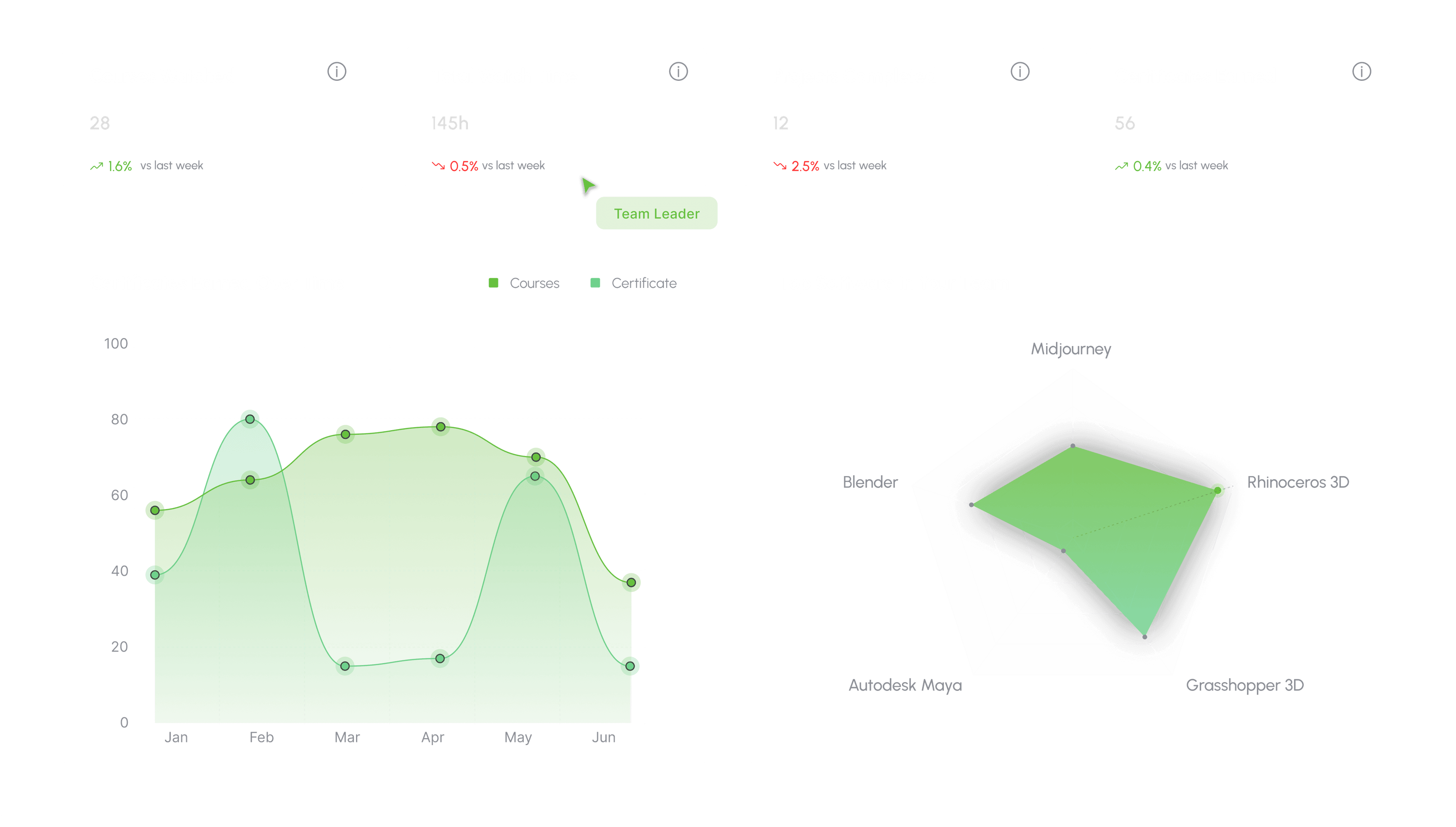
Customized team dashboard
A personalized workspace to manage your team's learning journey, track progress, and align courses with your studio's goals.
We value your privacy.
We use strictly-necessary cookies to keep you signed in and the service operational, and analytics cookies to understand how the site is used. With your consent, we also use preference and marketing cookies. You can change your choice anytime; see our Cookie Policy or Privacy Policy.
Elevate your team's computational design skills with PAACADEMY Team Access. Flexible seats, admin dashboard, workshops, and certificates for organizations.
Give your team access to the tools, technologies, workflows, and expertise shaping the future of the AEC industry, from AI and computational design to visualization and digital fabrication.
Trusted by leading architecture firms and universities worldwide.






Tell us about your studio and we will recommend Team or Enterprise seats, onboarding, and rollout next steps.
A personalized workspace to manage your team's learning journey, track progress, and align courses with your studio's goals.
Admins assign seats, track certificates, and optionally enable notes, bookmarks, and instructor Q&A while the team watches.
A personalized workspace to manage your team's learning journey, track progress, and align courses with your studio's goals.
Invite learners, assign live workshops and archives, and see completion without chasing individual memberships.
Increase completion with recognized certificates and achievement milestones.
Optionally enable lesson notes, bookmarks, and instructor answers while watching.
Onboarding guidance and priority support, with dedicated success on Gold.
We onboard your team, assign courses, and report progress from one dashboard. No individual memberships to chase.
Share team size, software stack, and whether you need a pilot or a full rollout.
Studio intake
Studio profile
Pilot or a full rollout
Whether you are a small studio or a large organization, workshops, archives, certificates, and seat management sit in one agreement. Talk to sales and we will match seats to your studio.
Team
For design studios scaling skills across a focused, growing team.
2–10 seats
Enterprise
Advanced seat management with reporting for scaling organizations.
10–20 seats
Looking for an individual plan? Compare memberships
500+ teams already joined
“What we like about PAACADEMY Team Access is the variety of topics available to our team. It gives our designers the freedom to explore AI, computational design, visualization, and other emerging technologies while learning from professionals working directly in these fields.”
Dean Mueller
Chief Architect and Director at Adrian Smith + Gordon Gill Architecture LLP
“Continuous learning is very important in a practice where design and technology are evolving so quickly. PAACADEMY Team Access gives our team a convenient way to explore new tools, workflows, and ideas alongside their professional work. The diversity of the course library makes it especially useful.”
Melike Altınışık
Founder of Melike Altınışık Architects
“We use PAACADEMY Team Access to give our students access to learning beyond the traditional classroom. They can explore AI, computational design, digital fabrication, and other emerging areas at their own pace. It's a valuable way for our students to stay connected with how architecture and technology are evolving.”
Georges Kachamy
Director of the Center for Research, Innovation, & Design, Professor of Architecture at American University in Dubai (AUD)
“PAACADEMY Team Access gives our team an easy way to keep exploring new tools and emerging design technologies. Having such a broad range of courses available in one place makes it much easier for everyone to learn at their own pace and bring new ideas into our work.”
Ila Colombo
Architect and founder of DEOND, co-founder of Ross Lovegrove Design
“We've been using PAACADEMY Team Access to give our team more opportunities to learn about AI, computational design, and new digital workflows. It's flexible, easy to use, and our team can choose the courses most relevant to their work. It's been a great addition to our professional development.”
Sinan Kılıç
Founder of Kasso Engineering
“PAACADEMY provides our team with access to emerging AI and design workflows through a flexible and scalable learning platform. The Team Access structure makes it easy to onboard and train evolving team members.”
Nard Buijs
Sydney Airport
“The platform gives our teams access to cutting-edge workflows across visualization, AI, and digital design. PAACADEMY has been a useful addition to our ongoing technology and design development initiatives.”
Anirudh Sood
AutSwanke
Quick answers on Team Access, seats, and onboarding.
More questions? Talk to sales
Individual Pro and Full Access plans are for single users. Team Access adds seat management, org-wide reporting, invoicing, and rollout support for multiple learners under one agreement.
Yes. Most organizations begin with the Team tier (2–10 seats), validate adoption with a pilot group, then expand to Enterprise or Gold as usage grows.
Yes. Team and Enterprise agreements support invoicing, POs, and annual billing. Contact our sales team with your procurement requirements.
Every business plan includes onboarding guidance, seat assignment best practices, and priority support. Gold plans include dedicated success support for large deployments.
Yes. Each seat is a full learner account with personal progress, certificates, and course access, while admins manage seats and reporting centrally.
Yes. Individual Pro and Full Access memberships include lesson notes, bookmarks, and course Q&A while watching. On Team Access, admins can optionally enable each feature for seats from the team management dashboard.
After your inquiry, our team typically responds within one business day with plan recommendations and next steps for seat provisioning.