We value your privacy.

We use strictly-necessary cookies to keep you signed in and the service operational, and analytics cookies to understand how the site is used. With your consent, we also use preference and marketing cookies. You can change your choice anytime; see our Cookie Policy or Privacy Policy.

Enter CartesianForms: Architecture Reimagined competition early to win from a $120,000 prize pool.
PAACADEMY
PAACADEMY
Courses
Software
Bundles
Membership
Become MemberSign In
Loading
PAACADEMYPAACADEMY

Online EdTech platform · 2020-2026

Shaping the next generation of designers, architects, and makers through computational tools and immersive education.

Reach out

team@paacademy.com

Newsletter

New workshops, early-bird seats, and release notes, straight to your inbox.

Platform

CoursesMembershipsBundlesProjectsInstructorsSoftwareBoardsBlogFree coursesEarnCertificatesReviews

Company

AboutBusinessBecome an InstructorContactFAQHelp CenterChangelogWe're Hiring

Popular Searches

Architecture coursesGrasshopper coursesAI architecture workshopsParametric design workshopsRhino courses3D modeling coursesBlender workshopsVisualization coursesRevit coursesDigital fabrication workshops3D printing workshopsSustainability courses

Most Interested

Urban design coursesLandscape architecture coursesHoudini coursesUnreal Engine coursesComfyUI workshopsMaya coursesInterior design coursesFashion design coursesFootwear design workshopsStructural analysis coursesVirtual reality coursesComputational design coursesGenerative city designBIM coursesMetaverse coursesPhotography workshops

© 2026 PAACADEMY. All rights reserved.

Privacy PolicyCookie PolicyRefund PolicyMembership Agreement
HomeBlog

Blog

Insights, tutorials, and news from the PAACADEMY community.

Loading posts…
HomeBlogLoading

Blog post

HomeBlogWhat is Blender 3D used for?

What is Blender 3D used for?

PAACADEMY11/15/20234 min read1 like
What is Blender 3D used for?

Article

Blender 3D is a very strong open-source suite that has succeeded in dominating the areas of 3D graphics and animation. It is considered to be an all-in-one suite for producing highly detailed 3D models and animations due to advanced modeling and sculpting tools. It offers users the chance to design complex things using polygon modeling or sculpting techniques and then animate them with advanced rigging and keyframe systems.

Blender is shipped with two powerful rendering engines: Eevee for real-time preview and Cycles for high-quality, physically based rendering, so you can get fast iterations along with realistic visuals. It supports a wide variety of simulations—fluid, smoke, and cloth dynamics—with a node-based compositing system for post-processing.

The video sequence editor and tools for game development are top of the features offered by Blender, making it a perfect fit for video editing and game asset creation. Since this is open source, frequent updates and a strong community of users would be ensured; thus, Blender is very well applied among professionals and enthusiasts alike.

Modeling and Sculpting
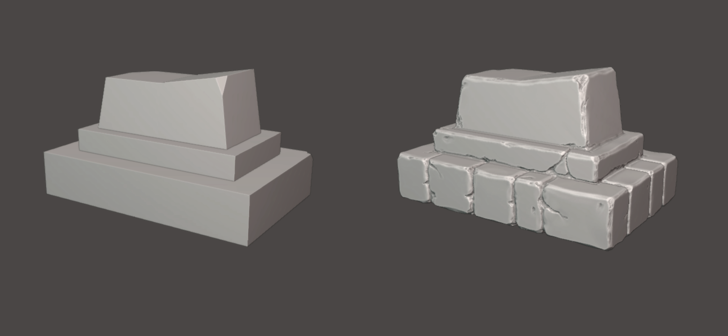
Blender sculpting

It has an inbuilt, full-featured modeling suite with tools for both beginner and experienced users. Polygon modeling allows the creation and improvement of models with greater control over vertices, edges, and faces. Still, the sculpt tools set Blender apart when it comes to detailed and organic modeling.

Dynamic topology and multi-resolution sculpting allow artists to add fine details and handle different levels of detail within a single model. It also allows procedural modeling using modifiers or even node-based systems to create more complex and dynamic geometries.

Animation and Rigging
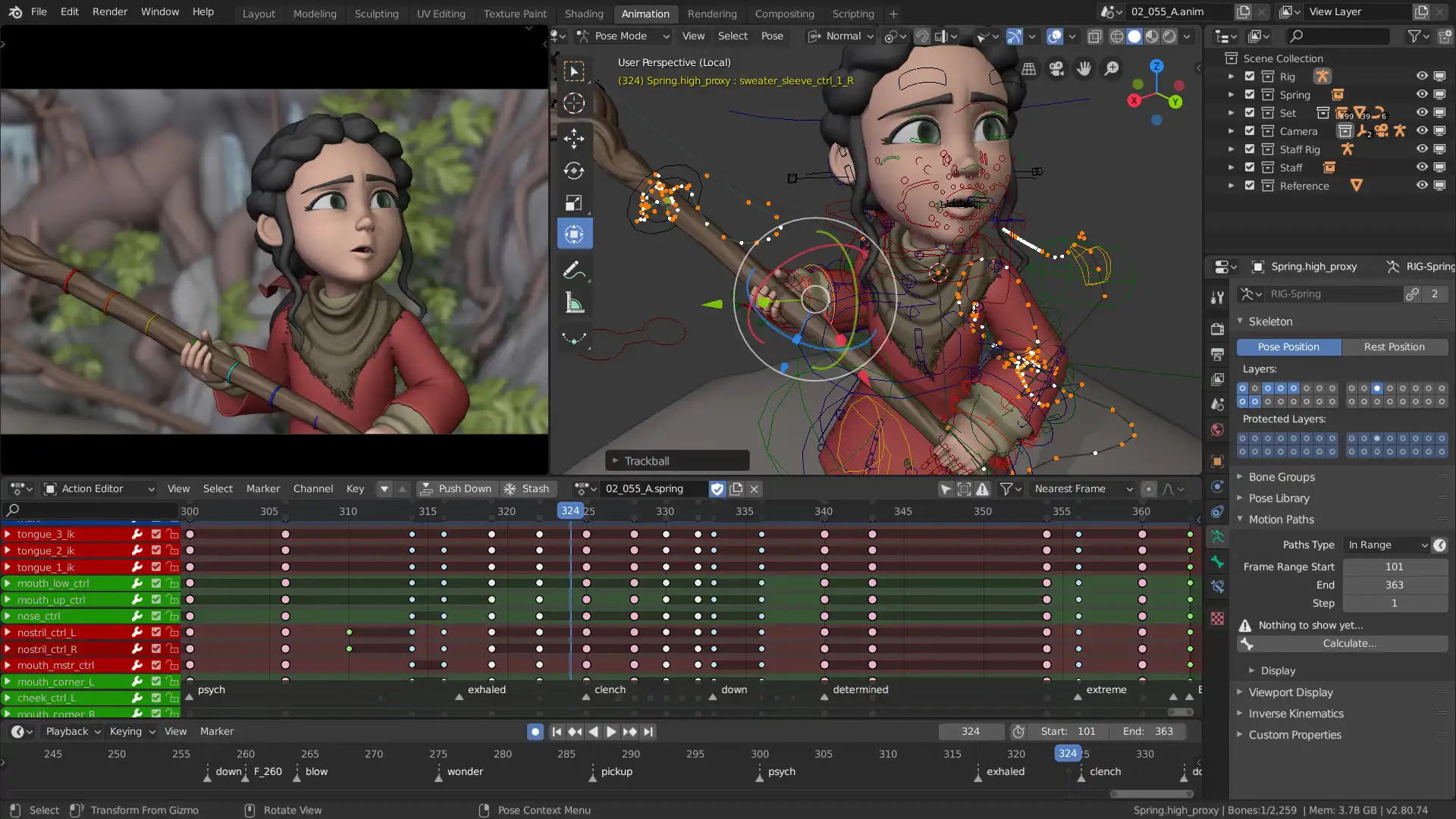
Blender animation rigging

Blender provides animation features, such as a strong timeline and graph editor for the creation and editing of keyframes. It provides rigging and is very rich in tools for constructing skeletons and controls for character animation.

Bone rigs can be created with constraints and IK to help simplify animation processes. Shape keys enable facial animation, together with other mesh-deforming capabilities, allowing flexibility in the animation of complex characters and objects. Also, the dope sheet and NLA editor in Blender also provide management and organization of animations.

Rendering and Shading
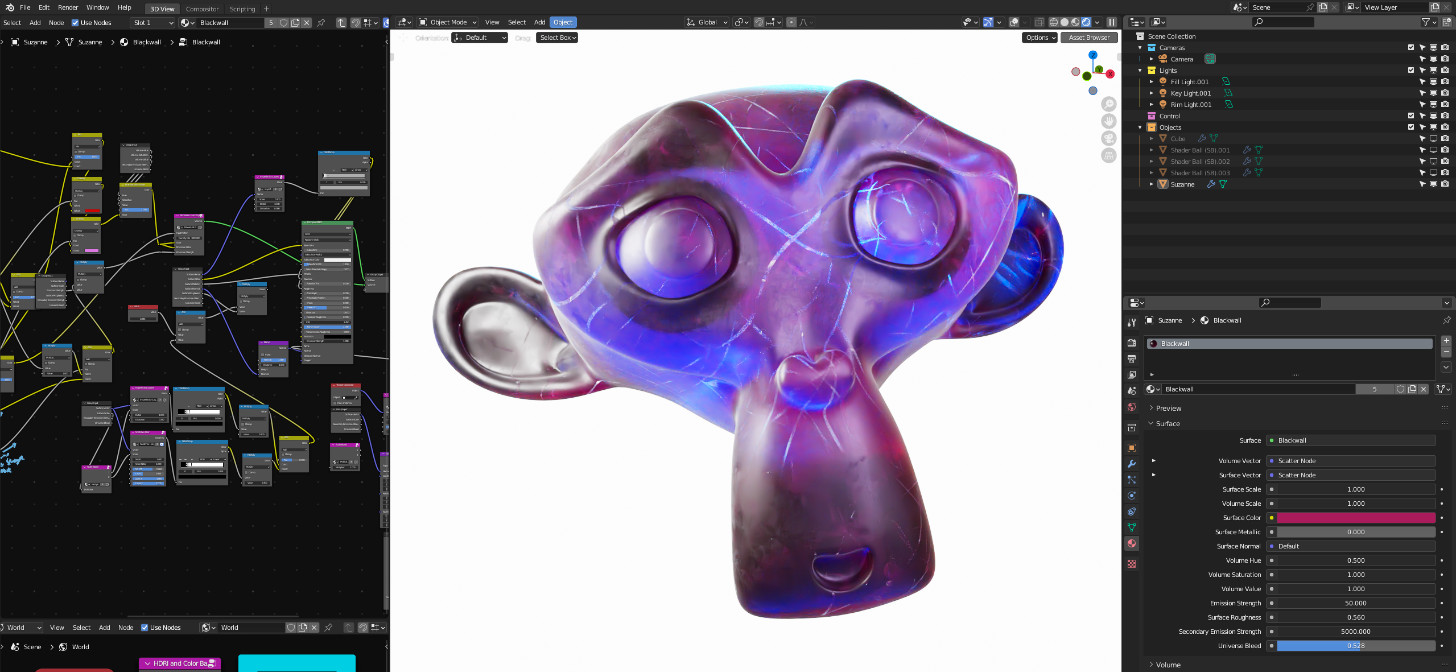
Blender animation shading

Two major rendering engines included in Blender are Eevee and Cycles

Eevee, on the other hand, is a real-time rendering engine. It has fast and very interactive previews that help in quick iterations, which are great for in-game asset creation.

On its part, Cycles is a path-tracing engine suitable for high-quality, physically accurate renderings—very suitable for final renders when realistic visuals are required. Blender's shader editor uses a node-based system that creates complex materials and textures that allow for a huge, intricate, customizable surface property. The ability to combine shaders, textures, and procedural effects can give a creator minute control over how your 3D scenes are to look.

Simulation and Compositing
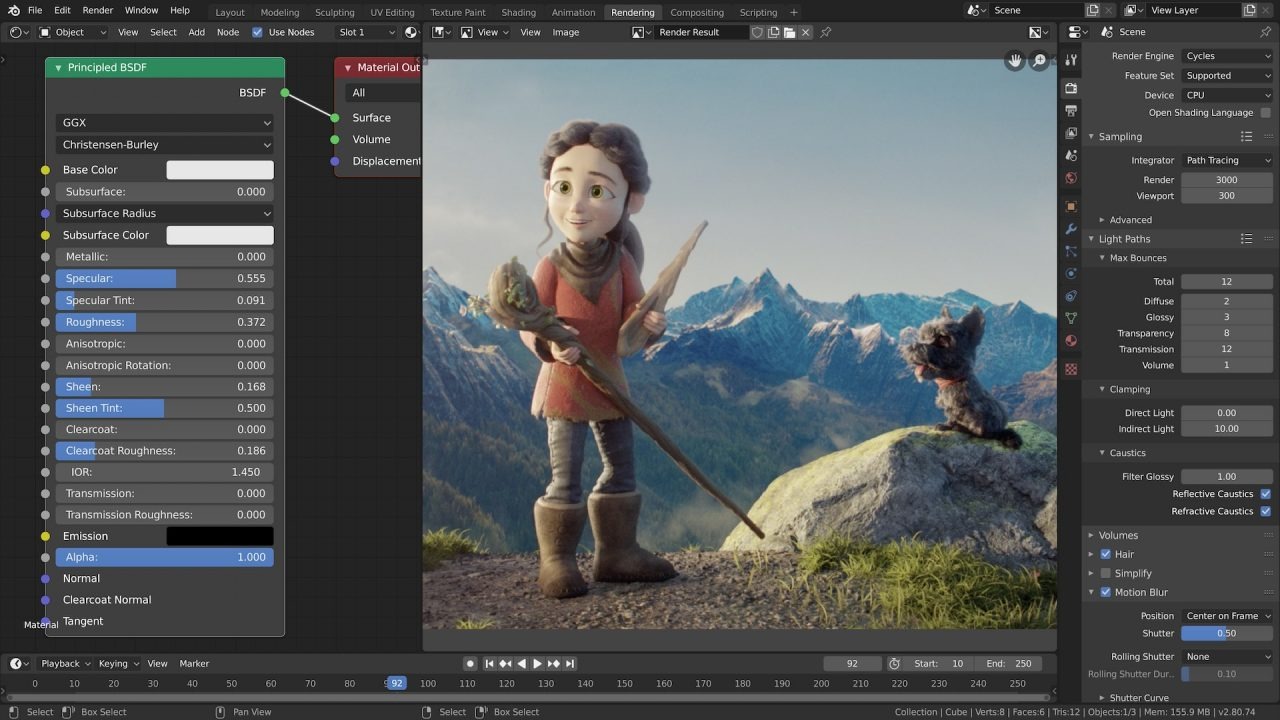
Blender simulation compositing

Blender has a set of internal simulations that can be used to add various types of physically realistic interactions to 3D models

 Fluid simulation can simulate the behavior of water, smoke, and other liquids in an enablingly realistic way. Smoke and fire simulations offer complex and convincingly realistic effects by advanced techniques. Cloth simulation brings realistic fabric motion and collision while rigid body dynamics allows interactions between rigid objects.

A very useful feature of Blender is its node-based compositing system, which has many effects, color corrections, and post-processing techniques that enable merging, manipulation, and enhancement of rendered images and animations.

Video Editing and Game Development
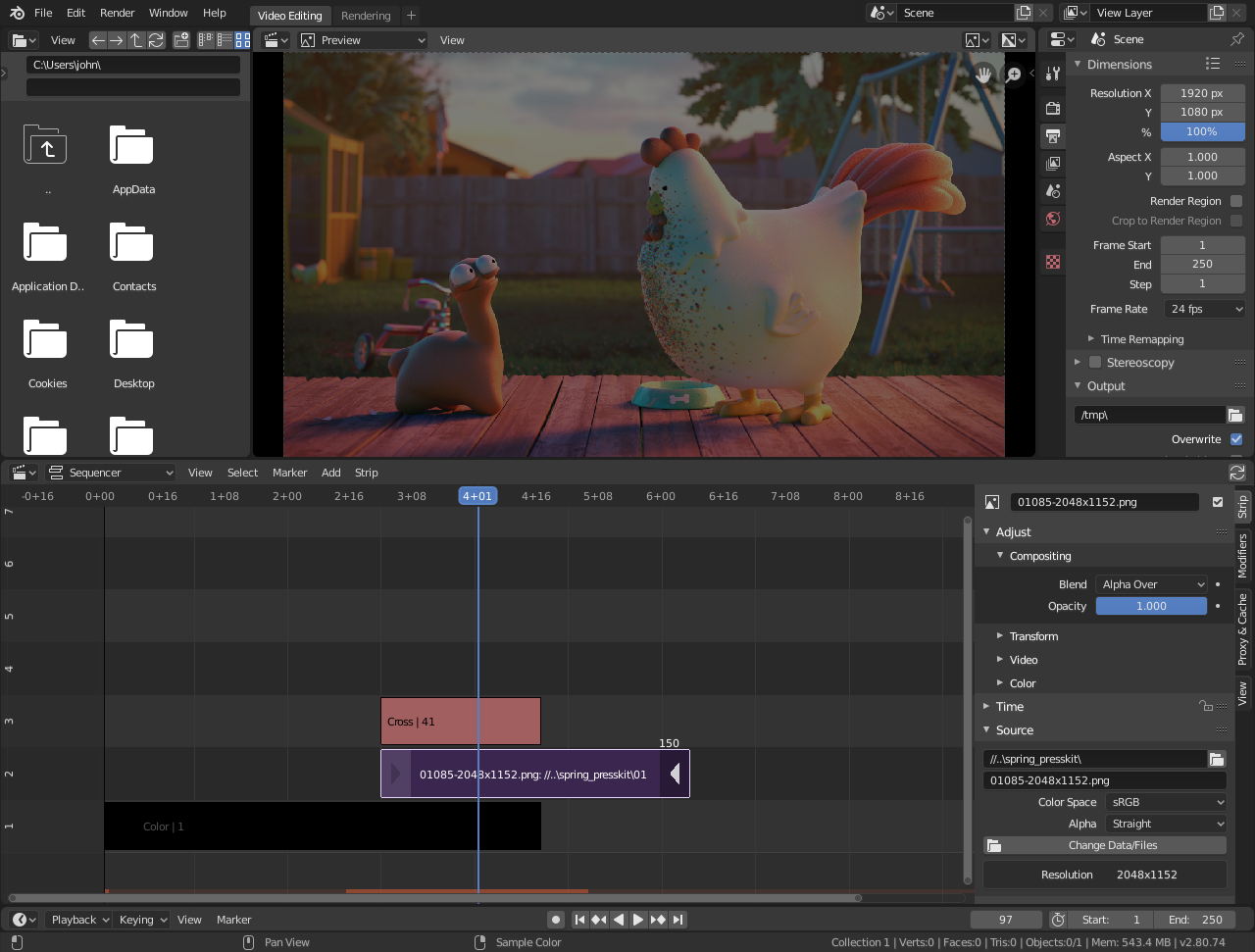
Blender video editing

Blender has a non-linear video editing facility called the Video Sequence Editor (VSE), which allows cutting, splicing, and effects in video clips. It includes support for multi-track video and audio, transitions, and a timeline-based interface.

For game development, Blender has at its disposal a wealth of tools to create and export assets—like models, textures, and animations—that the game engines, like Unity or Unreal Engine, make use of.

It is also excellent for supporting the export of assets in various formats and their integration into game pipelines, thus making it a very useful tool in the development of game content and prototypes.

Reviews

Excellent

Excellent

5 / 5 stars

0 Reviews
0 Comments

No reviews yet. Be the first!

Pro Membership

15% off workshops and Pro courses.

Join Pro

Upcoming Courses

View all
  • 01AI-Powered Design Exploration: From Ideation to VisualizationDaeho Lee
  • 02Monolithic Furniture: Large-Scale Additive ManufacturingLuc Morroni
  • 03Agentic Architecture 2.0: Astra/Sol – Fable/OpusFredy Fortich

Recent Courses

View all
  • 01Multi-Scalar Urbanism: Concept Buildups with AISarah Aladayleh
  • 02Architecture in Motion: AI Cinematic WorkflowsPouya Nasr
  • 03Tensegrity and Tensile Membranes in KangarooVirginia Melnyk
Software Training
#Blender
PAACADEMY
AuthorPAACADEMY
PAACADEMY

Related Posts

10 Popular Rhino 3D Plugins
Aug 8, 2024·PAACADEMY

10 Popular Rhino 3D Plugins

Blog

10 Popular Rhino 3D Plugins

Aug 8, 2024

Preview

Rhinoceros 3D, commonly known as Rhino 3D, is a 3D computer graphics and computer-aided design (CAD) application software developed by McNeel. It is well-known...

PAACADEMY
PAACADEMYAuthor
Read article→
Revit vs Rhino3D: BIM and 3D Modeling Compared
Jan 1, 2025·PAACADEMY

Revit vs Rhino3D: BIM and 3D Modeling Compared

Blog

Revit vs Rhino3D: BIM and 3D Modeling Compared

Jan 1, 2025

Preview

It is not always easy to find the best software for your design needs. Autodesk Revit and Rhino 3D are often compared, but they should actually be seen as compl...

PAACADEMY
PAACADEMYAuthor
Read article→
Top 10 Grasshopper3D Plugins for Architecture
May 9, 2025·PAACADEMY

Top 10 Grasshopper3D Plugins for Architecture

Blog

Top 10 Grasshopper3D Plugins for Architecture

May 9, 2025

Preview

What is Grasshopper3D used for? Grasshopper3D is a visual programming interface set within Rhino3D, it is being used as a computational design tool for users to...

PAACADEMY
PAACADEMYAuthor
Read article→
How Rhino3D & Grasshopper Transform Architectural Design
May 12, 2025·PAACADEMY

How Rhino3D & Grasshopper Transform Architectural Design

Blog

How Rhino3D & Grasshopper Transform Architectural Design

May 12, 2025

Preview

Within the field of architectural design, which captures evolving design methods and tools, Rhino3D and its visual programming plugin, Grasshopper, both have tr...

PAACADEMY
PAACADEMYAuthor
Read article→

Pro Membership

15% off workshops and Pro courses.

Join Pro

Upcoming Courses

View all
  • 01AI-Powered Design Exploration: From Ideation to VisualizationDaeho Lee
  • 02Monolithic Furniture: Large-Scale Additive ManufacturingLuc Morroni
  • 03Agentic Architecture 2.0: Astra/Sol – Fable/OpusFredy Fortich

Recent Courses

View all
  • 01Multi-Scalar Urbanism: Concept Buildups with AISarah Aladayleh
  • 02Architecture in Motion: AI Cinematic WorkflowsPouya Nasr
  • 03Tensegrity and Tensile Membranes in KangarooVirginia Melnyk